Categories
Tags
-
#Zoom and Microsoft Teams
#af international school of languages
#P11 multifamily marketing company
#Dentist in Colorado Springs
#social disability lawyers
#appellate practice attorney
#Plant-based milk recipe developers
#Baseball Glove Conditioning Break-In
#food product development
#Court Decision
#Rolled Bat
#lawyer for disability
#rolled fastpitch softball bats
#Disability lawyers tampa
#wedding photography shot list
#essential photo moments
#comprehensive shot checklist
#Florida appeal lawyers
#Wedding Photography New Jersey
#Kirkland Chiropractor Clinic
#Jaca rare sugar
#brown sugar
#cybersecurity online course
Archives
IRT Software Clinical Trials: Why User Experience Matters
-
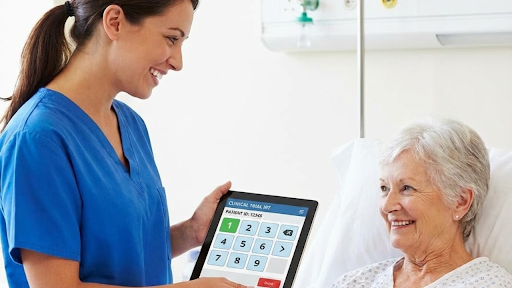
When discussing IRT software clinical trials, the conversation often gravitates toward backend features—sophisticated algorithms, robust integrations, and powerful data flows. While these components are essential, they are only part of the picture. The real success of an IRT software clinical trial depends heavily on the people who use it every day: the site staff. If the interface is confusing, slow, or unintuitive, it can lead to user errors, bottlenecks, increased helpdesk calls, and unnecessary frustration.
In a clinical setting where precision and timeliness are critical, the User Experience (UX) of an IRT platform is just as important as its functionality. This blog explores why UX matters and how it directly impacts patient safety, site satisfaction, and overall trial success.
The Impact of Poor UX on Clinical Sites
Clinical research coordinators, nurses, and pharmacists often manage multiple studies simultaneously. With limited time and increasing responsibilities, the last thing they need is an IRT system that complicates their workflow. Poor UX is more than an inconvenience—it can create operational and safety risks.
Preventing Dispensing Errors
One of the greatest dangers of a poorly designed IRT interface is the potential for medication dispensing errors. These mistakes can occur when the user fails to identify the correct kit or accidentally selects the wrong option in a cluttered interface.
Modern IRT software for clinical trials uses intuitive design elements to help prevent these errors, including:
-
Clear visual cues such as color coding for different visit types or drug arms
-
Barcode scanning, which significantly reduces the risk of selecting the wrong kit
-
Double-confirmation screens before finalizing drug assignment
-
Real-time alerts if an action seems unusual or outside expected parameters
By making critical tasks visually clear and easy to follow, designers help protect both the site staff and the patients they serve.
Reducing Training Time
High turnover at clinical research sites is common, which means new staff are frequently entering studies mid-trial. If the IRT system is complex, these new employees may require lengthy onboarding, slowing down site operations and placing additional burdens on sponsor and CRO support teams.
Intuitive UX design reduces this friction. Modern IRT platforms often incorporate design elements that mimic familiar consumer apps—simple icons, clean dashboards, and logical navigation patterns. When an interface feels familiar, new staff can begin using it confidently with minimal formal training.
This reduction in training time offers several benefits:
-
Lower operational costs for sponsors and CROs
-
Reduced site burden, leading to stronger site relationships
-
Fewer mistakes caused by unfamiliarity with system features
-
Greater compliance, as staff can easily follow required workflows
Effective UX isn’t just about making things look nice—it’s about ensuring every user can perform tasks correctly from day one.
Designing for the Modern User
As clinical trials evolve, so do the expectations of the people running them. Today’s users want software that feels smart, efficient, and accessible. Good UX in IRT software is defined by how well it supports the real-life situations site staff encounter every day.
Mobile-First Design
Site coordinators are rarely sitting at a single station. They move between exam rooms, storage areas, pharmacies, and administrative offices. For that reason, IRT systems must be fully responsive—working seamlessly on desktops, tablets, and smartphones.
A mobile-first design ensures that:
-
Users can perform essential tasks from anywhere
-
Drug accountability and patient randomization workflows don’t require a return to a fixed workstation
-
Staff can quickly check inventory or verify shipping information during patient visits
-
The system adapts to various screen sizes without sacrificing clarity or ease of use
Mobile compatibility increases efficiency and helps ensure that tasks don’t get delayed because the right device isn’t available.
Streamlined Workflows
Great UX anticipates user needs, guiding them through complex processes without confusion. Streamlined workflows are essential in an IRT system, especially in scenarios where time-sensitive decisions must be made.
High-quality workflow design includes:
-
Logical step-by-step guidance, especially during patient registration or randomization
-
Accessible eligibility checklists, ensuring users follow protocol requirements in the correct order
-
Contextual help text that explains what each field means and why it matters
-
Clear and actionable error messages, not cryptic system codes that require helpdesk intervention
For example, if a patient doesn’t meet a particular eligibility criterion, the system should not only flag the issue but explain the corrective action required. This clarity reduces frustration and ensures compliance with the study protocol.
The Strategic Value of UX in IRT Systems
When sponsors choose an IRT system with superior UX, they gain more than just a polished interface. They improve site engagement, strengthen trust, and reduce operational overhead. Sites that enjoy using the technology are more likely to:
-
Enter data accurately
-
Follow required workflows without shortcuts
-
Report fewer technical issues
-
Maintain higher morale during fast-paced trials
Better UX contributes to better data quality and operational efficiency—two core pillars of successful clinical trials.
Conclusion
Prioritizing UX in irt software clinical trials is not just about aesthetics; it's about patient safety and operational efficiency. By choosing systems that are designed with the end-user in mind, sponsors can build better relationships with their sites and ensure higher quality data.
-